DNS Records Types:
What is DNS ?
Let us Know how browser or client can hit the exact URL and browse the correct one we are looking for, how things works behind the scene. Let’s try to understand deeply
“How does a browser know where a website lives?”
For Example we search for the website www.google.com how does the browser know where is this domain exists over the internet/ Server and loads the website.
Behind all the Things there is one boss >DNS
Whenever Browser asks the IP of domain to DNS The DNS always answer the browser whom should I talk to next.
DNS as the phonebook of the internet :
DNS is like a Phonebook of the Internet
DNS translate the Human Readable Domain Names (example: www.chaicode.com) Into the IP address (example: 192.9.9.9) that computer understands and use for the communication. Computer only understand IP addresses.
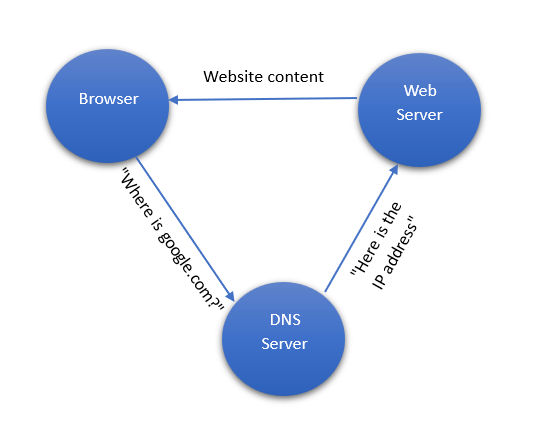
Here in the above figure browser asks DNS for the IP address and DNS replies with the address and after that Browser connects to the server.
DNS RECORDS
DNS Records response with which type of address you are looking for There are different types of DNS Records:
NS Record:
Identifies the authoritative name servers for a domain. NS points to the DNS Server IP
NS Tells that where is the DNS of this Particular Domain.
The NS record tells the internet:
Who holds the information which servers holds the addresses of the particular DNS.
Example : NS or nameserver is like a society office It tells everyone Whom to ask for information of the house.
A Record :
Maps the domain name as the 32bit IPV4 address. It stores limited number of addresses.
Example : Lets say there is website name = Persons name and House Number = IP address so whenever someone says where is google.com live ? the society office response with the house number (IP address).
AAAA Record :
Maps the domain name as the IPV6 address.
Example: Similarly Whenever someone asks where is live the particular website ? It replies with the IPV6 addresses.
CNAME Record : Creates an alias, pointing one domain/subdomain to another domain (e.g., www.example.com points to example.com). CNAME never points directly to an IP.
Example: We know that some websites and domains are created or handles by some platform like : Versal , Netlify. Now lets suppose our website is hosted on the versal and assume there are some problems with the Versal like Ip address is changed so it is possible that versal would tell all his customers to change the IP addresses and there is some possibility that some of the customer would not change the IP immediately so this is a huge problem everones’s website is going to down so in this case CName is comes into the picture..
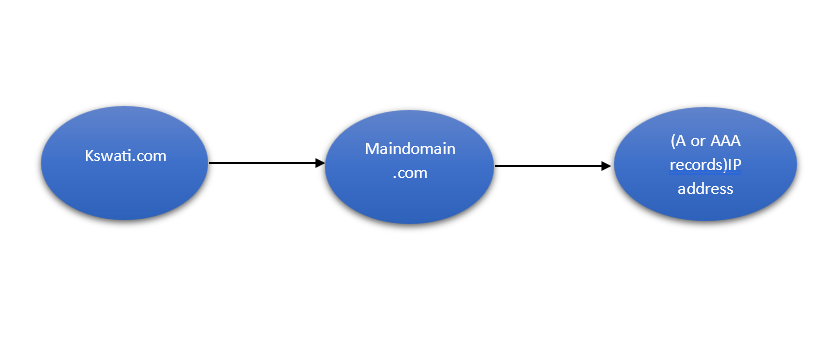
Fig : Goes to www.kswati.com sees it points to maindomain.com then looks up the A/AAAA record
MX Record:
Specifies mail servers responsible for handling emails for a domain. MX= Mail Exchange
Example : If someone sends an email to: swati@gmail.com
The internet asks DNS:
“Where should i deliver the email for gmail.com“
DNS answers with the MX record.
TXT Record :
Holds arbitrary text, often used for verification (like SPF records) or security.
A TXT record is a DNS record used to store text-based information about a domain.
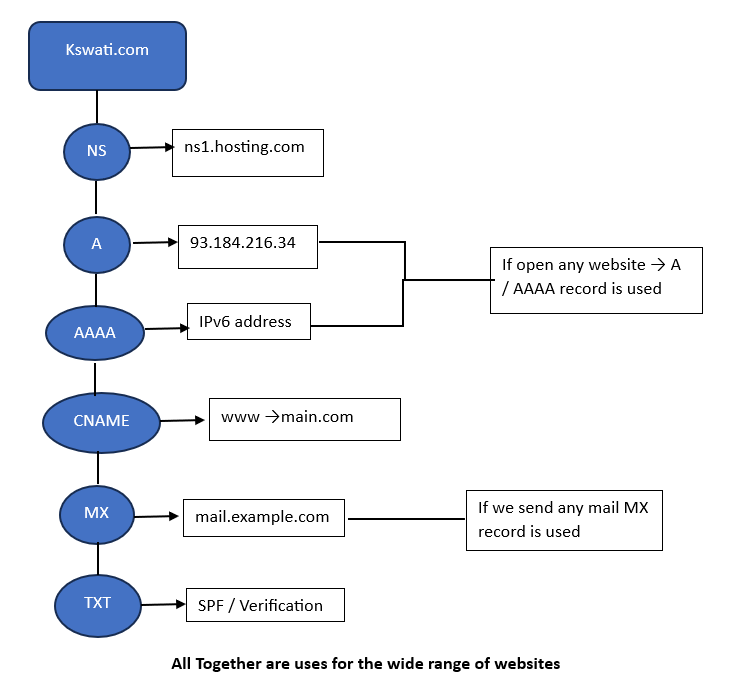
Difference Between NS and MX:
The Basic difference between the NS and MX is
NS- It only manages the Domain
MX- It knows where Email should go.
Difference Between A and CNAME:
A records directly points to the IPv4 addresses while CNAME is do not directly tells the IPV4 and IPV6 Addresses. It points to one to another domains.
In CNAME It points to another Domain and to another and the main domain is next do the DNS queries and tells the IP addresses.